Disclosure: I work for Apollo Automation. The M-1 LED controller in this post is one of our devices.
Yesterday’s post ended with a scoreboard that worked great as long as you had Home Assistant, the Team Tracker integration, and my blueprint. That’s three prerequisites for “show the score on the wall.” So the next day I built the version with none of them: gameday-scoreboard. You open the installer page in Chrome, plug in the M-1, click install, type your WiFi password, open the device’s web page and tap your team. The ESP32 fetches the game from ESPN on its own from then on.
It went from nothing to v0.1.0 in one afternoon and then through thirteen more releases over the next day and a half, because putting it on the wall during live games kept finding things. Here’s what was actually hard.
Fetching ESPN from an ESP32
Team Tracker reads ESPN’s public site API, so the device had to do the same. The problem is size. The NFL week scoreboard is about 250KB of JSON. The college one for every FBS game on a Saturday is 1.4MB. An ESP32-S3 with PSRAM can hold that, but parsing 1.4MB every few seconds to find one game is silly.
Two things fixed it. ESPN’s scoreboard takes a dates=YYYYMMDD parameter, and for college a groups=<conference> parameter, so the device asks for one day of one conference: 7 games, about 100KB. Then the JSON is streamed straight from the socket through an ArduinoJson filter that keeps only the 20 or so fields the board needs, so the full document never sits in memory. During a game the panel polls every 5 seconds and each fetch takes about 600ms.
Three ESPN quirks cost time:
- ESPN’s edge returns 403 to most User-Agent strings.
Mozilla/5.0,ESPHome/2026.8.1, Python’s default: all rejected. Anything starting withcurl/works. The device now introduces itself as curl. - ESPN’s JSON nests deeper than ArduinoJson’s default limit of 10 levels. The parse “succeeded” with half the fields empty and an error called TooDeep buried in the return value. Limit raised to 40.
- The conference group id comes back as the string
"1", not the number 1. Reading it as a number gave 0 and the college scoreboard URL asked for group 0.
The device rebooted itself after 15 minutes
First evening on the wall, the panel rebooted with No clients; rebooting in the log. ESPHome’s native API assumes a Home Assistant client will connect, and if none does for 15 minutes it restarts the device to recover. Sensible for a sensor, wrong for a device whose whole point is running without Home Assistant. One line, reboot_timeout: 0s, and it stays up.
The ticker froze every fetch
The first version fetched ESPN from the main loop, so the display animation paused for about a second every poll. At 20 seconds that was a hiccup. When I dropped polling to 10 and then 5 seconds it would have been a stutter every few seconds. The fetch and parse now run on their own FreeRTOS task with a 16KB stack, and the main loop only picks up the finished result. The parser was already pure code with host tests, so the only thing that had to move was the network call.
The page whose buttons did nothing
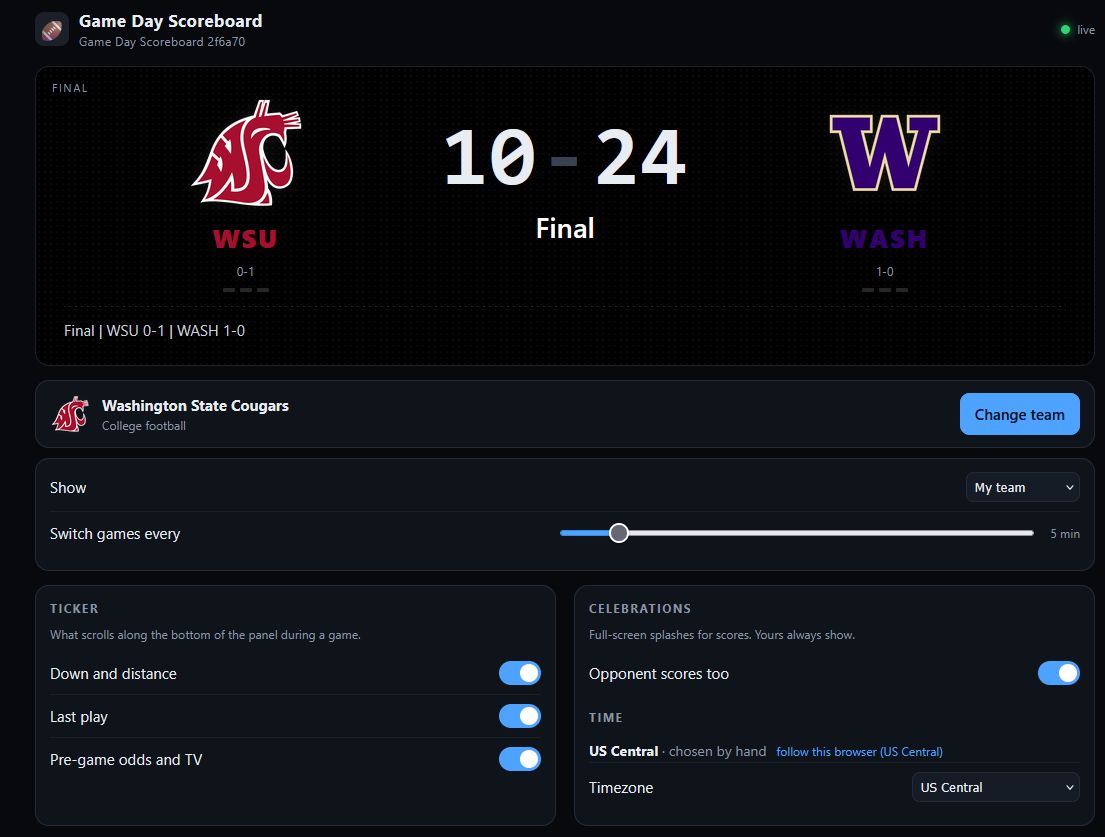
The stock ESPHome web page is an entity list. Fine for me, not something I’d hand a stranger. ESPHome can embed your own JavaScript and CSS into the firmware, and the page talks to the device over its event stream and a few POST endpoints, so I built a real page: a live board drawn like the panel, a team chooser with 170 logos and a search box, an “On now” tab that lists today’s games straight from ESPN (the browser fetches that part, so the device does no extra work), and the settings grouped in plain language.
I tested it against a mock of the device’s web server in a browser and everything worked. On the real device, picking Ole Miss showed “now following Ole Miss” and then “device did not respond (HTTP 404).”
The reason: this ESPHome release changed how the web server identifies entities. Older builds used select-team; this one sends select/Team and expects control URLs built from the entity’s display name, /select/Team/set. My page split on the dash, got nonsense, and every control on the page had been failing with a 404 since I shipped it. The toggles just looked like they flipped. My mock used the old format, which is why the browser test passed. Found it in about a minute by curling the device directly, then fixed the page and the mock. I should have curled the real device before writing the mock.
The dropdown that showed the wrong list
After a reboot the page said “No team chosen” while the panel was clearly following Clemson, and the Timezone dropdown listed every NFL and college team. Same bug for both. In the Python side of an ESPHome component, the generated-code enum values are placeholder objects, and comparing one with == is always truthy. So my “is this the team select or the timezone select” check said team every time, both dropdowns got the team list, and the stored team got published into the timezone dropdown. Compare the plain string instead. A related one: my parser for the timezone table also matched the comment line describing the table format, which is how “Display name” ended up as a timezone option.
Updates from the device page
With no Home Assistant there’s no update entity to click, so the firmware checks the project’s release manifest every 6 hours (the same manifest the browser installer uses), and the device page grows an Install button when a newer version exists. I proved that path by updating my own panel from v0.2.3 to v0.2.4 from the page. It worked; the page just didn’t reload afterward because it was waiting on an event stream the device only retries every 30 seconds. My first fix polled the device every 2 seconds and reloaded once it saw the panel go down and come back. From the couch it took 45 seconds, which was my fallback timer: a connection to a rebooting device hangs instead of failing, so the page never saw it go down. Now each probe gives up after 1.5 seconds and the page asks the device which firmware version it’s running, reloading the moment that number changes.
Once firmware comes over the network, the connection has to be verified. I’d turned certificate checking off for ESPN early on out of caution about their certificate chain rotating. It turns out ESPN’s API, their logo CDN, and GitHub Pages are all Let’s Encrypt, which is in the ESP-IDF bundle, so verification is on for everything now. The trade: if ESPN ever moves to a certificate authority outside that bundle, scores stop until a rebuild, which is one tag plus an over-the-air update away.
Switching teams felt slow
Picking a different team took a couple of seconds to change anything, then the logos showed up several seconds after that, and the display stuttered while they arrived. The data part was fine, about a second on its own task. The logos were the problem: each one was ESPN’s 500x500 PNG, up to 95KB, which the ESP32 downloaded in about 3.7 seconds and then decoded at full size before shrinking it to 32 pixels. The decode blocked the display for 1.7 seconds per logo.
ESPN has an image resizer on the same CDN. Ask for combiner/i?img=/i/teamlogos/ncaa/500-dark/228.png&w=64&h=64 and you get the same logo at 64 pixels in 2.7KB. That made the decode take milliseconds. The switch itself now shows the new team’s name and logo instantly with “Loading” in the clock slot, clears the old opponent’s logo, and fills in the game about a second later.
The clock lagged the down and distance
Watching a game, the down and distance would update to 1st and 10 while the clock still said 0:42 from the previous play. Both fields come from the same fetch and are drawn in the same update, so I assumed my code was reading stale state somewhere. It was ESPN. Their scoreboard carries the clock twice: a raw clock and period that move promptly, and a pre-formatted “0:42 - 2nd” string that trails them by a poll or two. I’d been showing the formatted one because it handles Halftime and End of 3rd for free. Now the clock line is built from the raw fields and the formatted text is only used when there’s no clock to show.
Timezone with no lookup service
Kickoff times need a timezone and the device has no way to know where it is. My first pass was a 32-entry dropdown plus a “this browser is in US Central, use it?” prompt. Both got rejected within a minute of being seen (“why can’t it just auto-apply?”). The browser already knows its zone, and the phone you open the page on is in the same room as the panel, so the page now just sets it, and the Time card is one line: “US Central, set from this browser.” Picking a zone by hand turns the automatic behavior off so it sticks. The list itself is down to 14 zones.
Smaller things worth knowing
- Logos are decoded on the device from ESPN’s dark-background PNGs. A 95KB PNG downloads and shrinks to 32x32 in about 3.7 seconds, which only happens when the team changes.
- “12:34 - 2nd” was too wide for the middle column on the two-panel layout and wrapped, so “2nd” landed on top of “1st & 10.” It’s “12:34 2nd” now.
- GitHub’s auto-generated release notes only list merged pull requests. This repo commits straight to main, so the first six releases had empty notes. There’s a changelog now, one section per version, and the build fails if you tag without one. The section also goes into the firmware manifest, so the device page shows what’s new next to the Install button.
- GitHub Pages’ default environment only lets
maindeploy. The first tagged release failed with a job that had no steps at all, which is how GitHub tells you a protection rule refused it. Allowingv*tags fixed it. - On Windows,
esphome compilefor esp-idf has to run from PowerShell. The toolchain installer refuses to run under Git Bash. I had this written down from July and still lost a build to it.
What’s there
Two prebuilt images (one 64x64 panel, or two side by side), a browser installer, a device page that needs no manual, over-the-air updates, and 136 host-side tests for the parser and splash logic. The last two releases of the day added a “Show” dropdown that ignores your team and jumps between live NFL or college games at random every few minutes, and WizMote support with the four numbered buttons mapped to favorite teams. The remote part hasn’t been tried with a real WizMote yet. Every live game so far has been college. The Cowboys are the first NFL test, and the single-panel layout has never been seen on a real single panel yet. Both are next.
If you have an M-1 and a panel, the installer page is the whole setup.